Usability testing

Usability Study

Usability for songdew.com
Category

Music Tech SaaS

B2C


Tools

Figma

Team

1 × product designer, 2 × product managers, 4 × engineers


Timeline

2022

Contribution

UI/UX Design, Usability Testing, User Research, Audit, Prototyping, Design Toolkit

Introduction


Songdew.com, India’s largest indie artist network with 55K+ members, helps artists promote, monetise, and globally launch their music through its platform, label services, and Songdew TV , a unique channel showcasing top indie music via curated videos and shows


Project

In 2022, Songdew wanted to improve the Opportunity Module, a central space where artists discover, filter, and participate in brand-led music opportunities. This module is critical to keeping users engaged and ensuring artists regularly contribute content.


Core Idea-


Think of it like applying for auditions: if the sign-up sheet is hidden, messy, or confusing, artists will miss their chance to perform. For indie musicians, these opportunities are the “stage” where their talent gets recognized. A poor experience here means disengagement and lost chances.

In 2022, Songdew wanted to improve the Opportunity Module, a central space where artists discover, filter, and participate in brand-led music opportunities. This module is critical to keeping users engaged and ensuring artists regularly contribute content.


Core Idea-


Think of it like applying for auditions: if the sign-up sheet is hidden, messy, or confusing, artists will miss their chance to perform. For indie musicians, these opportunities are the “stage” where their talent gets recognized. A poor experience here means disengagement and lost chances.

In 2022, Songdew wanted to improve the Opportunity Module, a central space where artists discover, filter, and participate in brand-led music opportunities. This module is critical to keeping users engaged and ensuring artists regularly contribute content.


Core Idea-


Think of it like applying for auditions: if the sign-up sheet is hidden, messy, or confusing, artists will miss their chance to perform. For indie musicians, these opportunities are the “stage” where their talent gets recognized. A poor experience here means disengagement and lost chances.

Problems

The Opportunity module faced multiple usability and design issues that limited engagement:

  • Inconsistent icon proportions and deviation from design guidelines.

  • Misaligned text, poor spacing, and cluttered layouts.

  • Opportunity page lost in the menu, confusing for new users.

  • Badges and rewards unclear, not aligned with user expectations.

  • No review step during submissions → frequent user errors and frustration.

Impact

The redesign of the Opportunity module’s navigation significantly improved discoverability, clarity, and user engagement. By elevating Opportunities into a highlighted top card, introducing clear categorization, and refining cards and filters, users can now quickly find relevant opportunities and navigate workflows with confidence. Explicitly showing constraints and adding visual cues like a progress bar reduces errors and frustration, making the entire experience more intuitive and satisfying.

Goals

  • Centralise and highlight the Opportunity module.

  • Simplify browsing and filtering of opportunities.

  • Ensure clarity of rewards, eligibility, and participation steps.

  • Introduce a review/confirmation step to reduce errors.

  • Improve consistency across devices (desktop, tablet, mobile).

Process & Context
To redesign the Opportunity Module, I followed a structured, insight-driven approach.


We started by auditing screens across devices—spotting inconsistencies, errors, and friction points. Then, we planned research and mapped user profiles: new joiners, past winners, inactive users.


Next, task scenarios were created to test usability, and 7 participants were recruited for diverse perspectives. During testing, we observed behaviors, noted frustrations, and captured feedback.


Analysis combined analytics, heatmaps, and interviews. Patterns emerged, pain points were prioritised, and opportunities became clear.


We realised we could stand out by:

  • Simplifying workflows

  • Automating repetitive tasks

  • Building trust through clarity


Page Functionality

  • Opportunity Listing: Where artists browse and discover new opportunities.

  • Opportunity Details: Providing comprehensive information about each opportunity.

  • Participation Process: Guiding artists through the steps to engage and submit their entries.

To redesign the Opportunity Module, I followed a structured, insight-driven approach.


We started by auditing screens across devices—spotting inconsistencies, errors, and friction points. Then, we planned research and mapped user profiles: new joiners, past winners, inactive users.


Next, task scenarios were created to test usability, and 7 participants were recruited for diverse perspectives. During testing, we observed behaviors, noted frustrations, and captured feedback.


Analysis combined analytics, heatmaps, and interviews. Patterns emerged, pain points were prioritised, and opportunities became clear.


We realised we could stand out by:

  • Simplifying workflows

  • Automating repetitive tasks

  • Building trust through clarity


Page Functionality

  • Opportunity Listing: Where artists browse and discover new opportunities.

  • Opportunity Details: Providing comprehensive information about each opportunity.

  • Participation Process: Guiding artists through the steps to engage and submit their entries.

To redesign the Opportunity Module, I followed a structured, insight-driven approach.


We started by auditing screens across devices—spotting inconsistencies, errors, and friction points. Then, we planned research and mapped user profiles: new joiners, past winners, inactive users.


Next, task scenarios were created to test usability, and 7 participants were recruited for diverse perspectives. During testing, we observed behaviors, noted frustrations, and captured feedback.


Analysis combined analytics, heatmaps, and interviews. Patterns emerged, pain points were prioritised, and opportunities became clear.


We realised we could stand out by:

  • Simplifying workflows

  • Automating repetitive tasks

  • Building trust through clarity


Page Functionality

  • Opportunity Listing: Where artists browse and discover new opportunities.

  • Opportunity Details: Providing comprehensive information about each opportunity.

  • Participation Process: Guiding artists through the steps to engage and submit their entries.

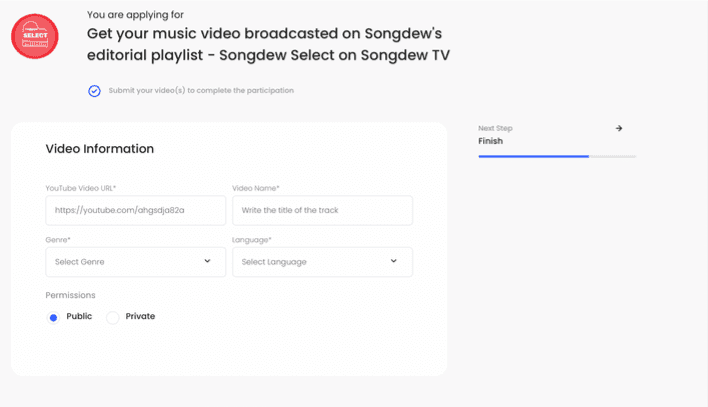
Process page- Filling of all the important information.


Brand Perspective/ User perspective-

To fill in the information as soon as possible without taking much time and artists can select their already uploaded tracks directly without much hassle.
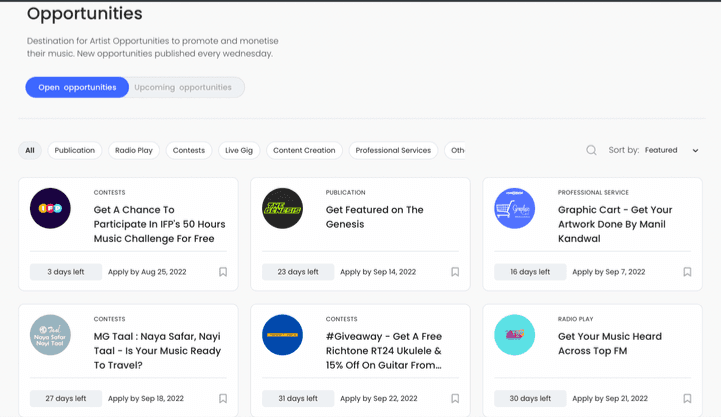
Listing Page - Where all the opportunities hosted by songdew are shown.


Brand Perspective:
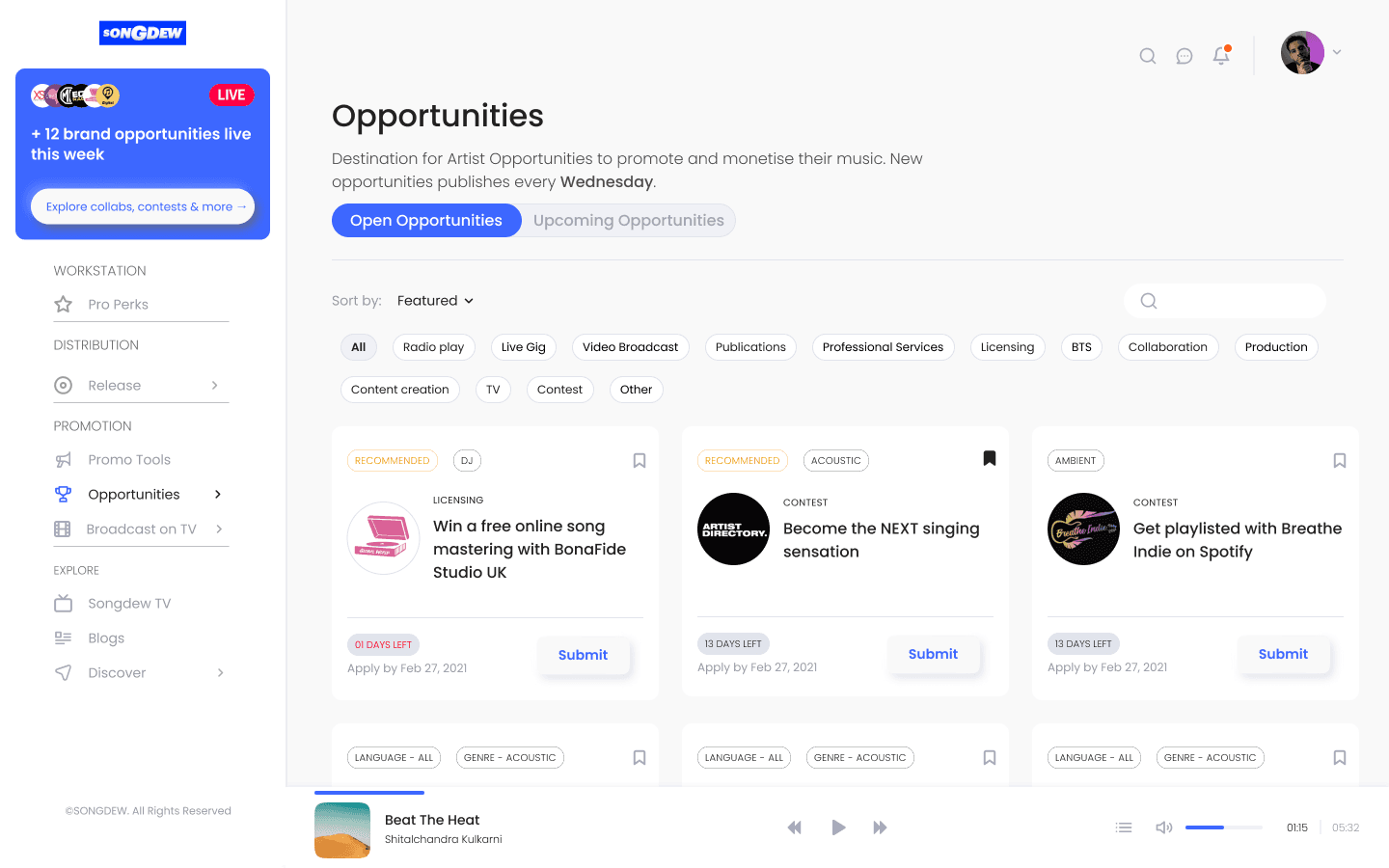
This page empowers artists to discover and filter opportunities by genre, location, and language. It also showcases Songdew’s brand collaborations, building trust and encouraging repeat visits. Upcoming opportunities can be bookmarked, keeping artists engaged weekly.


User Perspective:
Users want to quickly find relevant opportunities with minimal clutter, ensuring a smooth and focused browsing experience.
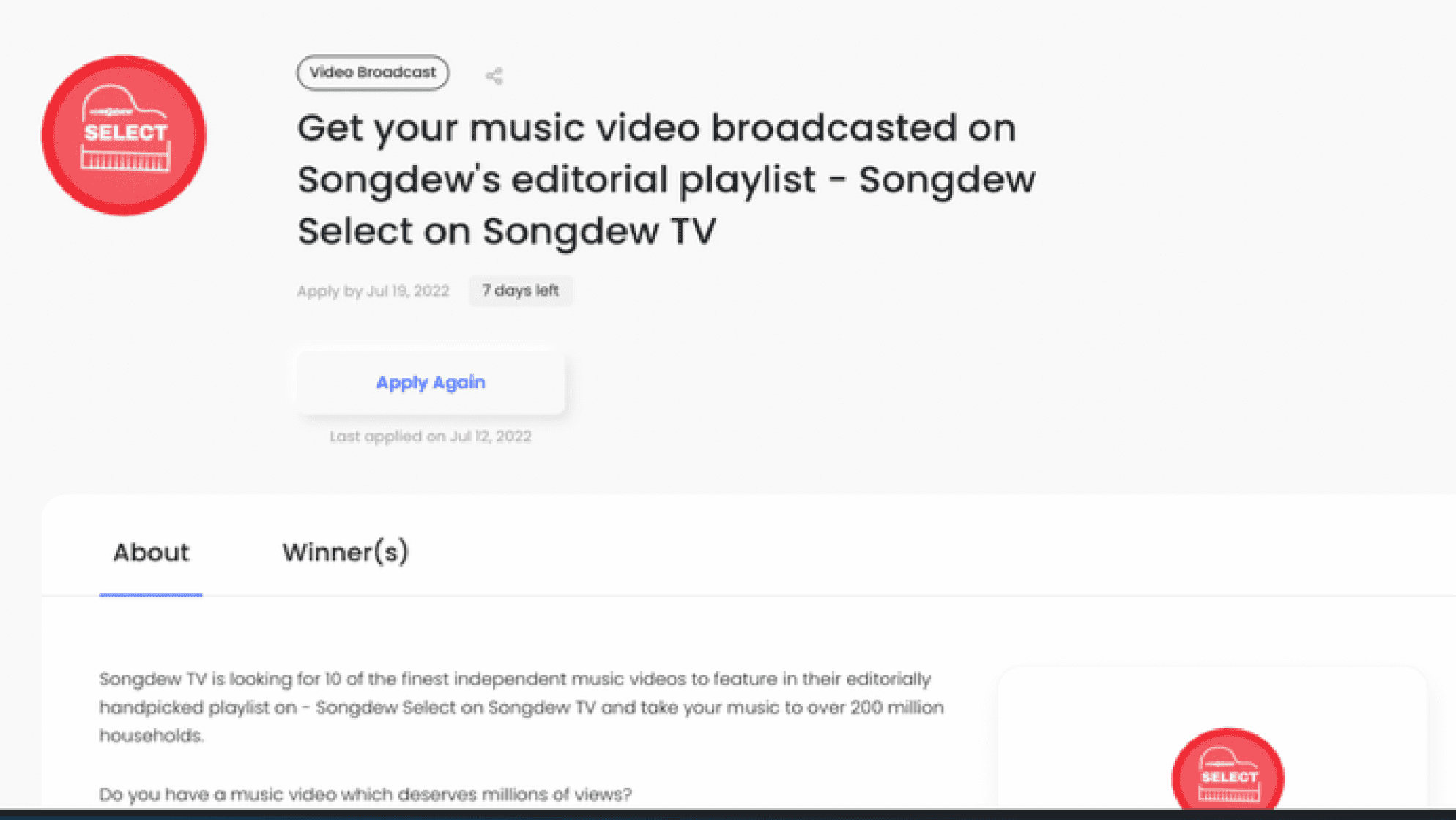
Detail Page - details of participation are shown like rewards and criteria


Brand Perspective:
Highlighting badges and rewards motivates artists to stay engaged and participate regularly.


User Perspective:
Users want to quickly understand benefits, eligibility (like location), and easily scan info to join opportunities with minimal effort.

Research &

Testing

Quantitative data from Google Analytics, Hotjar session recordings, and heatmaps was used to analyse click patterns and user journeys, helping form research hypotheses, eliminate obvious assumptions, and create a solid foundation for qualitative testing.


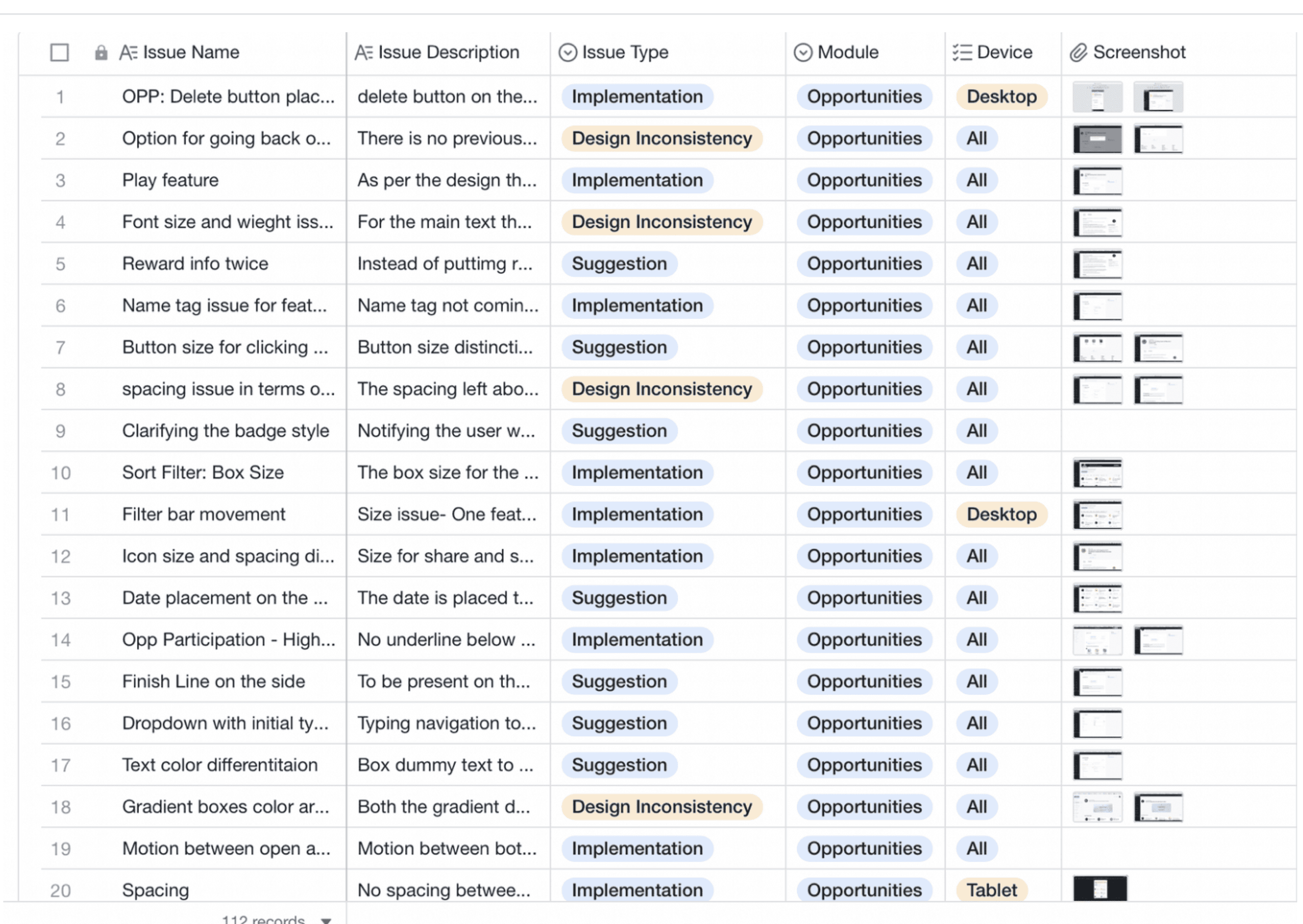
Auditing -

Categorisation of the whole website was done on the basis of devices and module with pictures supporting the issue type like design inconsistencies, implementation mistakes and design suggestions.


Checked for different gadgets like Dekstop, Tablet and Phone.


Maintaining a record of it with proper documentation.

No. of screens were checked, out of which

26

28

34

10

Had Implementation Mistakes

08

Had Design Inconsistencies

06

Had Improvement Suggestions

08

Had Implementation Mistakes

05

Had Design Inconsistencies

03

Had Improvement Suggestions

15

Had Implementation Mistakes

10

Had Design Inconsistencies

04

Had Improvement Suggestions

Research &
Testing

Quantitative data from Google Analytics, Hotjar session recordings, and heatmaps was used to analyse click patterns and user journeys, helping form research hypotheses, eliminate obvious assumptions, and create a solid foundation for qualitative testing.


Auditing -

Categorisation of the whole website was done on the basis of devices and module with pictures supporting the issue type like design inconsistencies, implementation mistakes and design suggestions.


Checked for different gadgets like Dekstop, Tablet and Phone.


Maintaining a record of it with proper documentation.

Quantitative data from Google Analytics, Hotjar session recordings, and heatmaps was used to analyse click patterns and user journeys, helping form research hypotheses, eliminate obvious assumptions, and create a solid foundation for qualitative testing.


Auditing -

Categorisation of the whole website was done on the basis of devices and module with pictures supporting the issue type like design inconsistencies, implementation mistakes and design suggestions.


Checked for different gadgets like Dekstop, Tablet and Phone.


Maintaining a record of it with proper documentation.

No. of screens were checked, out of which

26

28

34

10

Had Implementation Mistakes

08

Had Design Inconsistencies

06

Had Improvement Suggestions

08

Had Implementation Mistakes

05

Had Design Inconsistencies

03

Had Improvement Suggestions

15

Had Implementation Mistakes

10

Had Design Inconsistencies

04

Had Improvement Suggestions

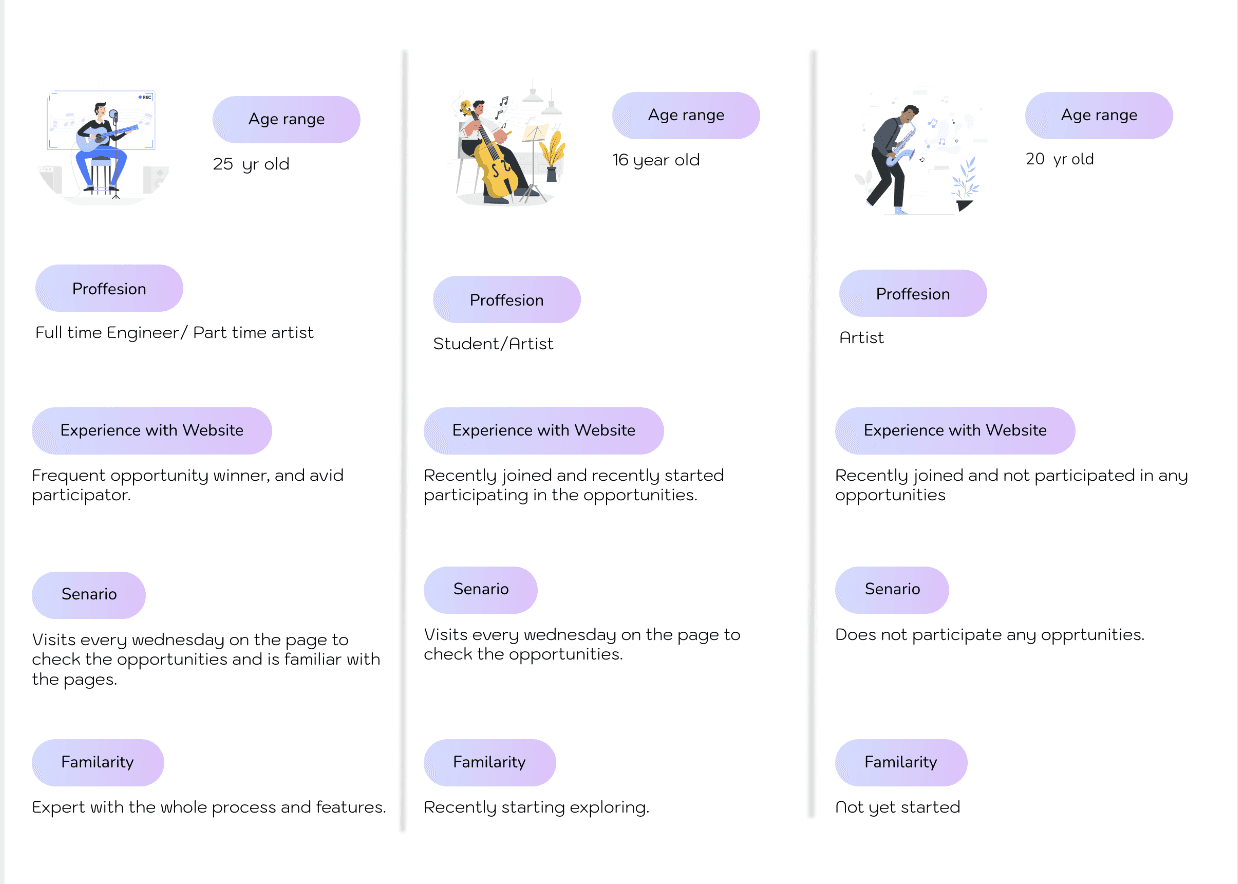
User Profiles

7 users in which 2 were the new users who recently joined, 2 of them were old user who were the winner of opportunity and 3 were those users who joined but not participating in any opportunity.

Design System
Findings

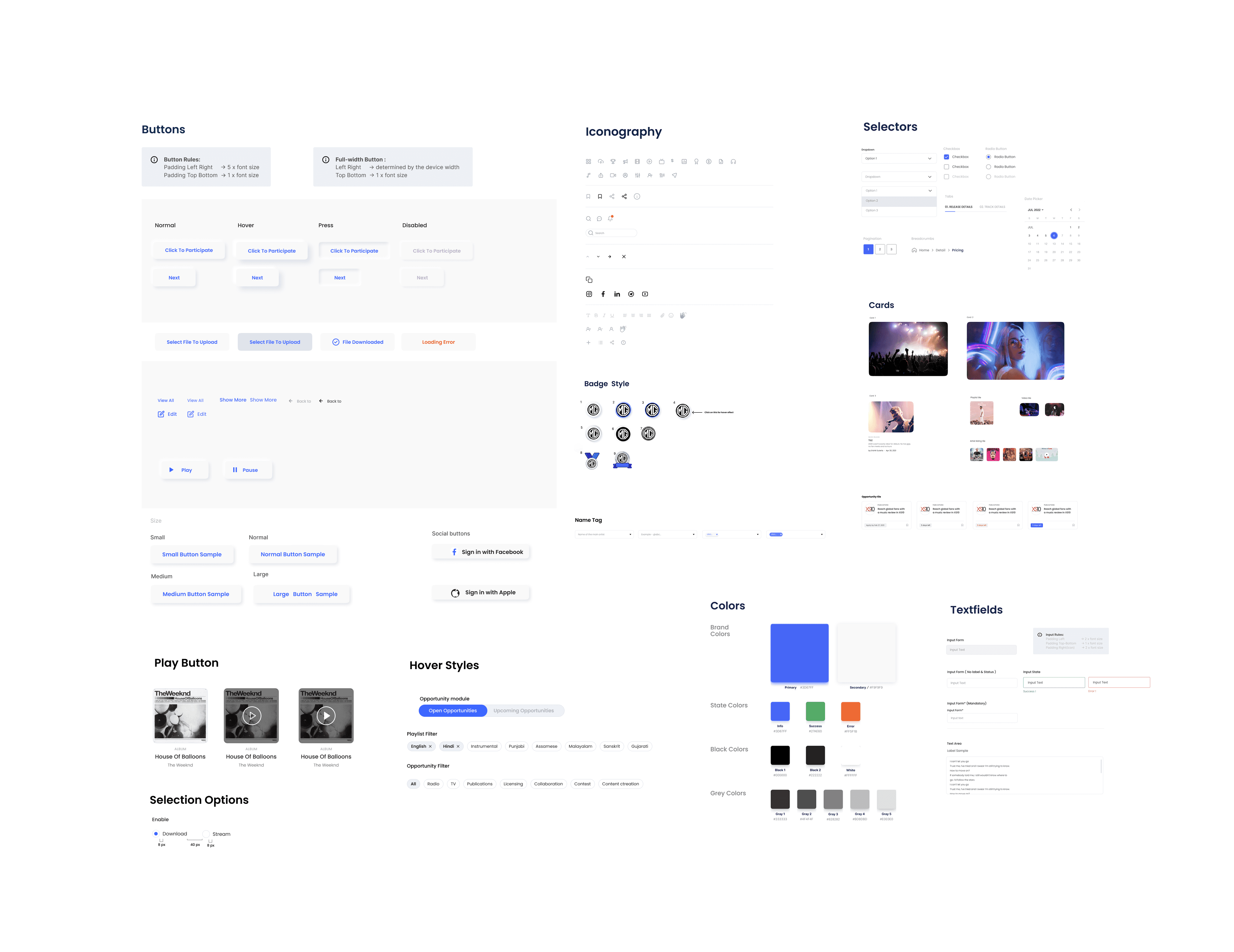
New users struggled to understand the brand’s services, highlighting the need for guide boxes across the website. The process page required a seamless layout with clear information boxes, and a review step was essential to reduce errors. To ensure consistency and support these improvements, a comprehensive design toolkit was also created for the company.
Old

Old

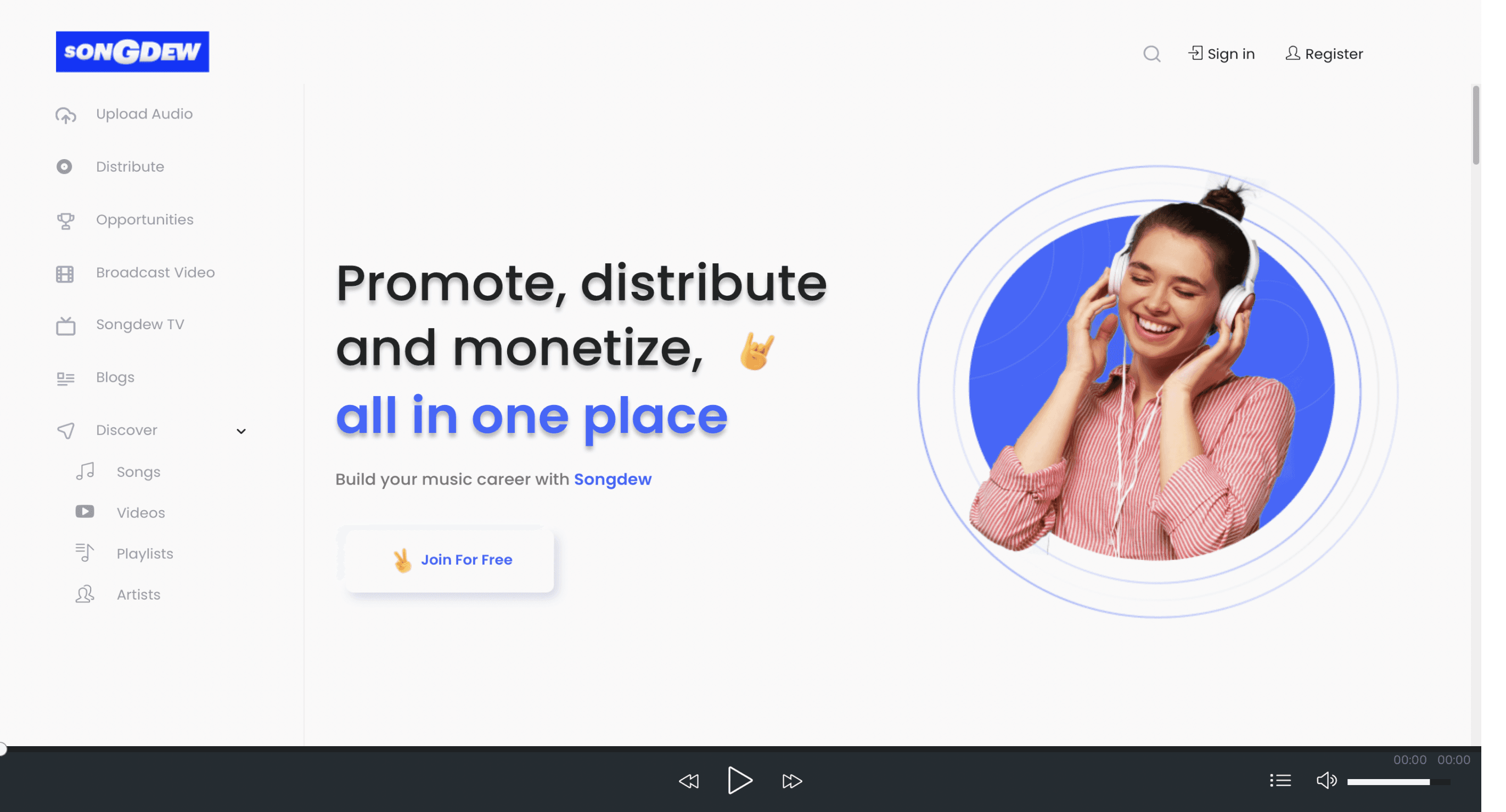
Recognition rather than recall-


  • The opportunity page is the most important but is getting lost in the menu bar, causing confusion for new users.

  • This means the system is not making the important functionality visible enough, so users cannot easily recognize or find it.

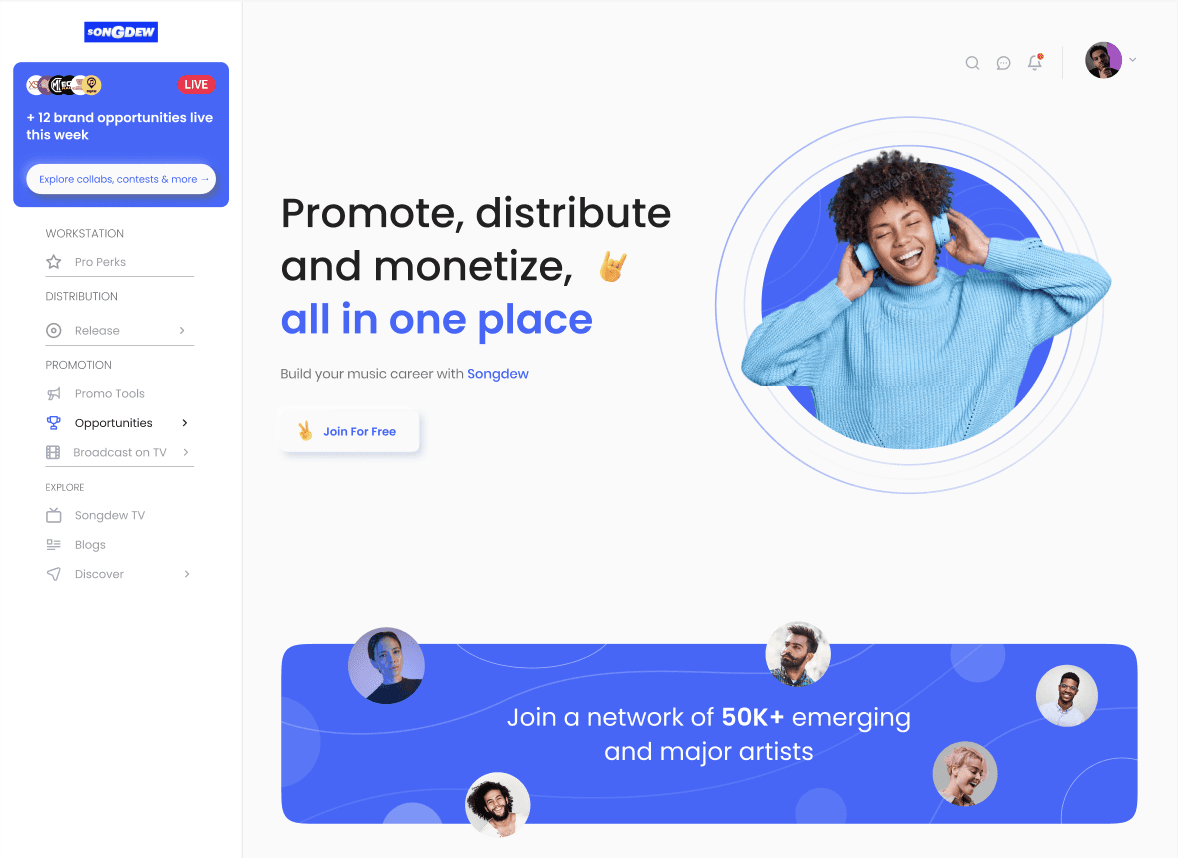
New

  • Priority Shift in Navigation- Pulled Opportunities out from being "just another nav item" → elevated into a highlighted card at the top.


  • I introduced clear categorisation (Workstation, Distribution, Promotion, Explore), which improves scannability and reduces cognitive load. 

Old

Consistency and standards-


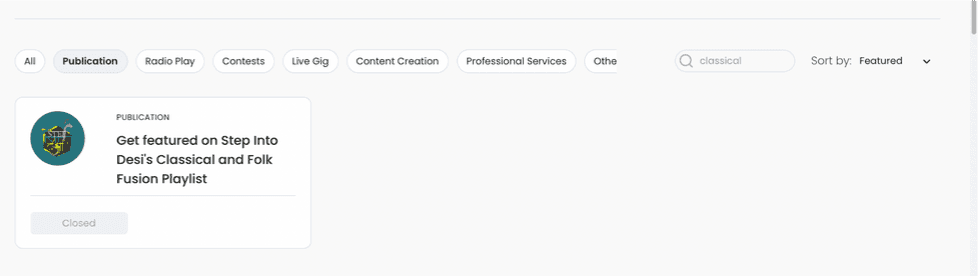
  • The system behaves inconsistently by applying filters that the user did not select.

  • search show different results, categorisation in the cards are not mentioned properly.

New

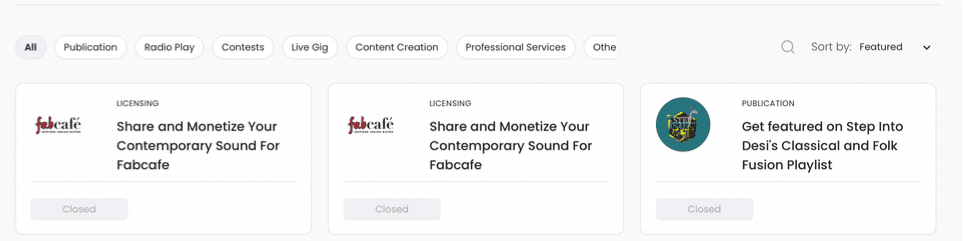
  • Filter clarity- Filters were redesigned to be consistent and user-controlled, with scannable chips.


  • Cards were refined to show category, timeline, and action clearly, reducing ambiguity.

Old

User control and freedom


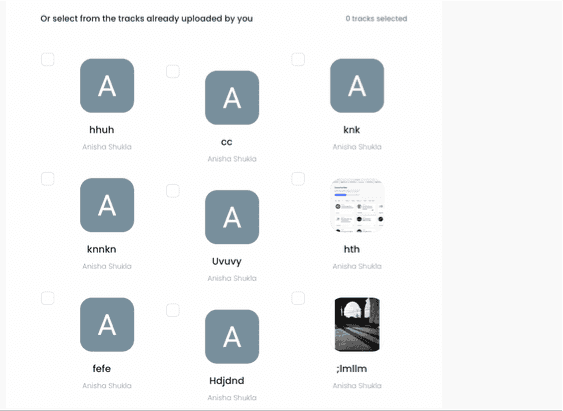
  • Artists are not aware of constraints (max 5 songs) and can get stuck or make mistakes without a clear way to fix or review.


  • Once a track was chosen, there was no clear way to undo, review, or replace it. Users risked getting stuck in the flow without a recovery option.


  • Progress bar on the side was minimal and not informative, creating a sense of one-way progression with no visibility of where the user stood in the process.

New


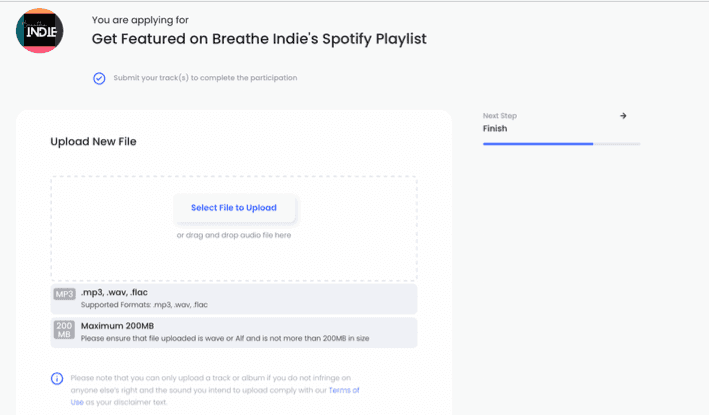
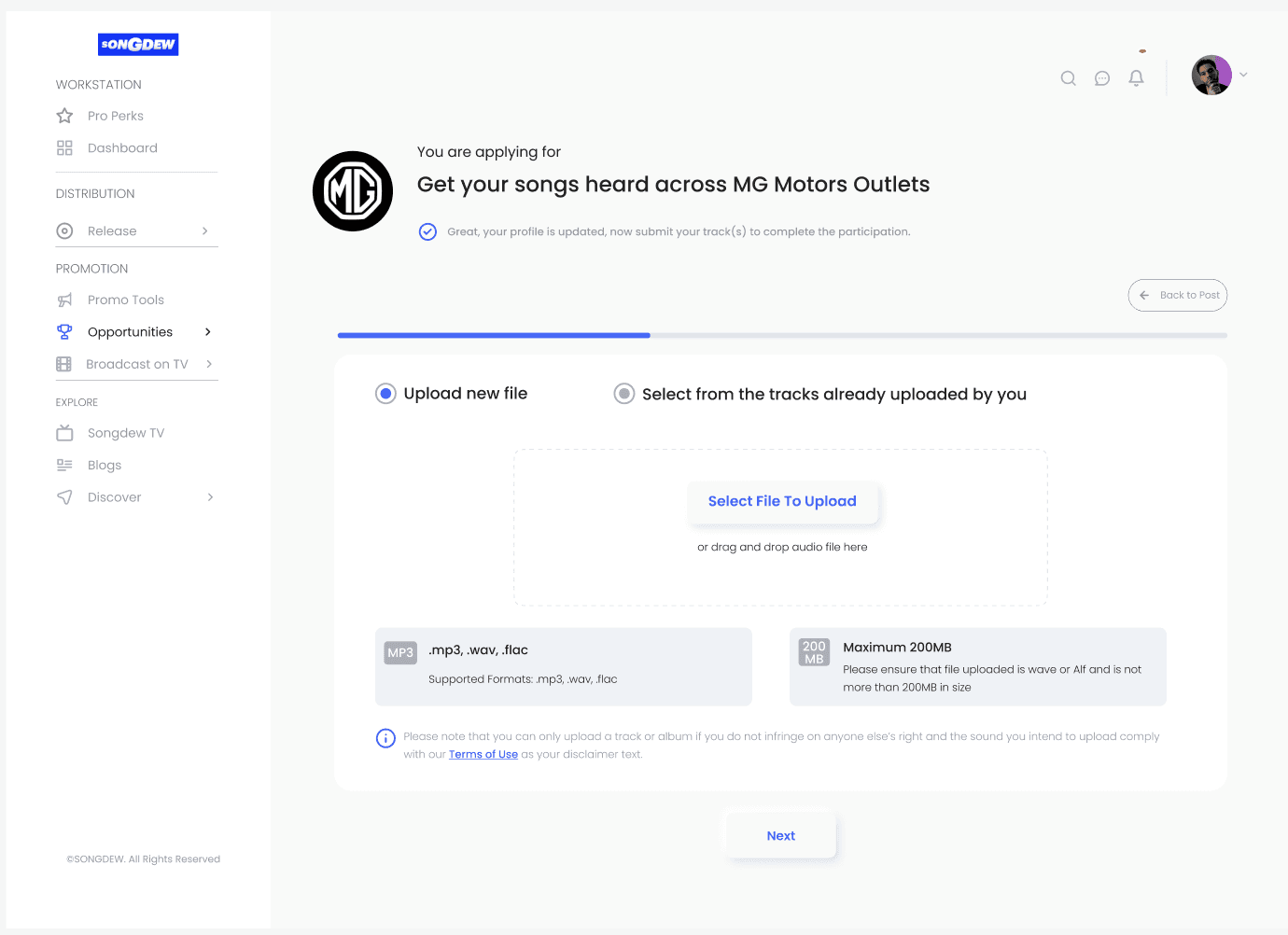
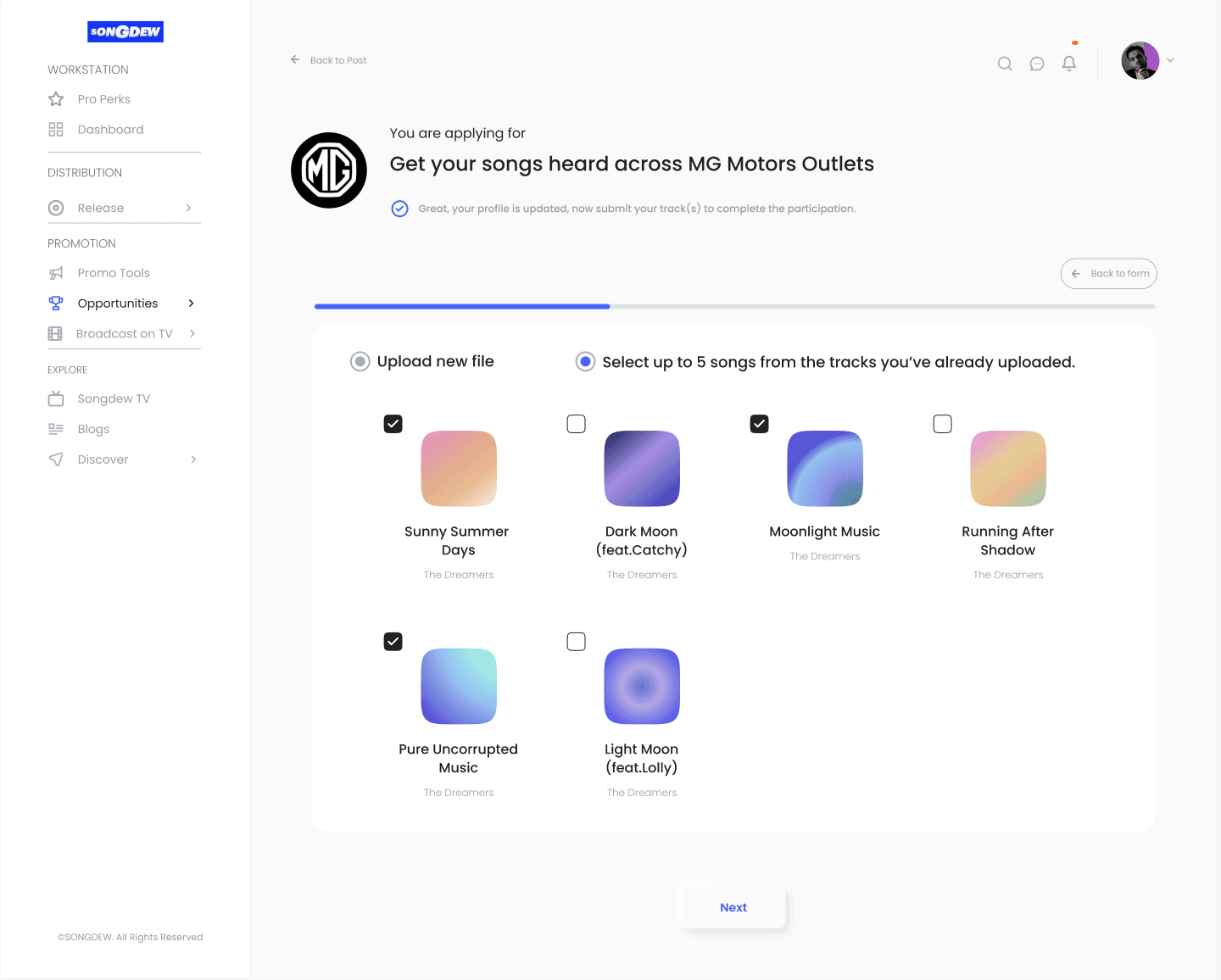
  • Constraints like maximum track count, file size, and formats are made explicit upfront, reducing the chance of errors.


  • A visible “Back” option and a top-positioned progress bar support easy navigation and process transparency.


Old

Recognition rather than recall-


  • The opportunity page is the most important but is getting lost in the menu bar, causing confusion for new users.

  • This means the system is not making the important functionality visible enough, so users cannot easily recognize or find it.

New

  • Priority Shift in Navigation- Pulled Opportunities out from being "just another nav item" → elevated into a highlighted card at the top.


  • I introduced clear categorisation (Workstation, Distribution, Promotion, Explore), which improves scannability and reduces cognitive load. 

Old

Consistency and standards-


  • The system behaves inconsistently by applying filters that the user did not select.

  • search show different results, categorisation in the cards are not mentioned properly.

New

  • Filter clarity- Filters were redesigned to be consistent and user-controlled, with scannable chips.


  • Cards were refined to show category, timeline, and action clearly, reducing ambiguity.

Old

User control and freedom


  • Artists are not aware of constraints (max 5 songs) and can get stuck or make mistakes without a clear way to fix or review.


  • Once a track was chosen, there was no clear way to undo, review, or replace it. Users risked getting stuck in the flow without a recovery option.


  • Progress bar on the side was minimal and not informative, creating a sense of one-way progression with no visibility of where the user stood in the process.

New


  • Constraints like maximum track count, file size, and formats are made explicit upfront, reducing the chance of errors.


  • A visible “Back” option and a top-positioned progress bar support easy navigation and process transparency.


Learnings

Next steps include testing the redesigned process and guide boxes with a broader user group to validate improvements and iterating based on feedback. Key learnings highlighted the importance of clear guidance for new users, transparent workflows, and the value of a consistent design system to support scalable, user-friendly experiences.